SecondsUnix systems, APIs and command-line tools
1704067200commonly 10 digits
Local & private
Convert between Unix timestamps and human-readable dates across UTC, local time and IANA time zones. Seconds through nanoseconds are supported, and every conversion stays in your browser.
Enter a date, time and time zone to get the corresponding Unix timestamp.
No time zones found
Milliseconds are fixed at 0 for date input.
All Unix timestamps are measured from 1970-01-01 00:00:00 UTC.
A Unix timestamp is a numeric representation of one moment in time. It usually
counts the number of seconds that have elapsed since 1970-01-01 00:00:00 UTC, a
reference point known as the Unix epoch. The value 0 identifies that
starting instant, while positive values represent later moments and negative values
can represent dates before 1970.
Unix timestamps are also described as Unix time, epoch time or POSIX time, and the single word “unixtime” is sometimes used informally. These names usually refer to the same underlying idea: storing an instant as a number instead of a formatted calendar date. This makes values compact, sortable and easy to exchange between systems.
For example, 1704067200 represents 2024-01-01 00:00:00 UTC. Because the
number identifies an instant rather than a location, it can appear as different clock
times in New York, London, Shanghai or Tokyo. The instant remains unchanged; only the
human-readable representation changes.
UnixTick provides both directions of conversion on this page. Paste an epoch value to read it as UTC, local time and ISO 8601, or enter a date, time and IANA time zone to calculate Unix seconds and milliseconds. The converter preserves large integers and performs the calculation locally in your browser.
Traditional Unix time is measured in seconds, but modern applications often store additional precision. Digit length is a useful clue rather than an absolute rule: negative values, historical dates and dates far in the future can have different lengths.
1704067200commonly 10 digits
1704067200000commonly 13 digits
1704067200000000commonly 16 digits
1704067200000000000commonly 19 digits
Each example above represents the same instant. Adding three decimal places changes the unit from seconds to milliseconds without changing the intended date. Interpreting a value with the wrong unit can instead produce an invalid or unexpectedly distant result, which is why UnixTick always displays the detected unit.
Paste a numeric epoch value into the timestamp field. UnixTick checks its magnitude and interprets common values as seconds, milliseconds, microseconds or nanoseconds. Results update automatically and include UTC, your browser’s local time, an ISO 8601 value and the exact normalized input. Copy buttons let you reuse a result without reformatting it.
Automatic unit detection is useful when a value comes from an API response, database row, application log or analytics export and the source does not clearly document its precision. The detected unit and confidence remain visible so you can verify the interpretation before relying on the converted date.
Choose a calendar date, enter a time with seconds and select an IANA time zone. UnixTick converts that local date and time into Unix seconds and milliseconds. Selecting the correct zone matters because the same wall-clock time can describe different instants in different locations.
The converter also checks daylight-saving transitions. If a local time is skipped or occurs twice, UnixTick explains the problem or asks you to select the intended offset instead of silently returning an ambiguous value. Milliseconds are fixed at zero for date input so the generated result is predictable.
A Unix timestamp does not contain a time zone. It identifies one instant relative to UTC. A time zone changes only how that instant is displayed as a calendar date and clock time. UTC output is useful for APIs, databases and communication between systems, while local output is easier for a person to read.
An IANA zone such as America/New_York or Europe/Paris applies
historical and daylight-saving rules that a fixed offset cannot fully represent. ISO 8601
values ending in Z represent UTC. Values ending in an offset such as
+08:00 or -05:00 show the difference from UTC used for that
displayed date and time.
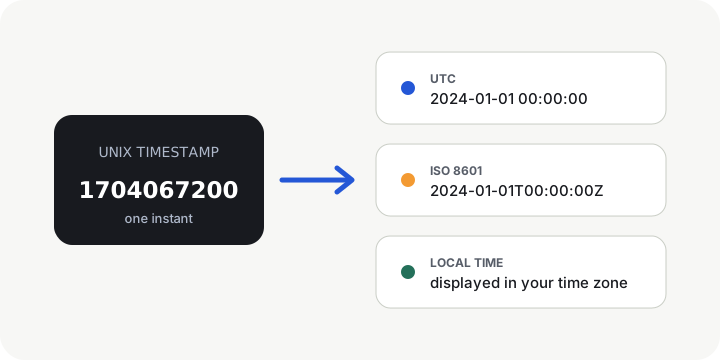
The examples below convert 1704067200 into 2024-01-01 00:00:00 UTC and
convert the same UTC date back into Unix seconds. Always make the unit and time zone
explicit: JavaScript commonly uses milliseconds, while many server-side APIs use seconds.
Multiply Unix seconds by 1,000 for Date; divide milliseconds by 1,000 for seconds.
const timestamp = 1704067200;
const date = new Date(timestamp * 1000);
console.log(date.toISOString());

const unixSeconds = Math.floor(
  new Date("2024-01-01T00:00:00Z").getTime() / 1000
);Pass an explicit UTC zone so the result does not depend on the server’s local configuration.
from datetime import datetime, timezone

date = datetime.fromtimestamp(1704067200, tz=timezone.utc)
print(date.isoformat())

value = datetime(2024, 1, 1, tzinfo=timezone.utc)
unix_seconds = int(value.timestamp())The modern java.time API represents the UTC instant directly and avoids legacy formatters.
import java.time.Instant;

Instant instant = Instant.ofEpochSecond(1704067200L);
System.out.println(instant);

long unixSeconds = Instant
    .parse("2024-01-01T00:00:00Z")
.getEpochSecond();A leading @ creates the date from epoch seconds before applying a display zone.
<?php
$date = (new DateTimeImmutable("@1704067200"))
    ->setTimezone(new DateTimeZone("UTC"));

$value = new DateTimeImmutable(
    "2024-01-01 00:00:00",
    new DateTimeZone("UTC")
);
echo $value->getTimestamp();Use time.Unix for seconds and nanoseconds, then choose UTC before formatting.
timestamp := int64(1704067200)
date := time.Unix(timestamp, 0).UTC()
fmt.Println(date.Format(time.RFC3339))

parsed, _ := time.Parse(
    time.RFC3339,
    "2024-01-01T00:00:00Z",
)
fmt.Println(parsed.Unix())
PostgreSQL can convert epoch seconds and time-zone-aware values without application code.
-- Unix seconds to UTC timestamp
SELECT to_timestamp(1704067200) AT TIME ZONE 'UTC';

-- UTC timestamp to Unix seconds
SELECT EXTRACT(
  EPOCH FROM TIMESTAMPTZ '2024-01-01 00:00:00+00'
)::bigint;Check when an event occurred, when a token expires or whether two services recorded the same instant.
Translate machine-oriented values from server logs, traces and analytics exports into readable dates.
Review stored epoch values, compare records and convert between database timestamps and application formats.
Create a precise value for a job, notification or cache expiry while accounting for the intended time zone.
Unix time is widely used because numeric values are compact and easy to compare, but a complete integration must still document its unit and display zone. For formal references, see the Open Group specification for POSIX time() and RFC 3339 date and time formats.
UnixTick does not upload values to a conversion API. Timestamp parsing, time-zone lookup and date generation run locally in this page, which is useful when working with internal logs or identifiers that should not be sent to another conversion service.
It can be either. UnixTick automatically detects seconds, milliseconds, microseconds or nanoseconds and shows its confidence.
In everyday developer usage, yes. Unix time, epoch time and POSIX time usually describe elapsed seconds from the Unix epoch at 1970-01-01 00:00:00 UTC. A particular system may store extra precision in milliseconds, microseconds or nanoseconds.
No. It represents one instant in UTC. A time zone changes the readable date.
Enter the millisecond value directly. UnixTick recognizes common 13-digit values and preserves the three fractional digits. In JavaScript, a millisecond timestamp can be passed directly to new Date(value).
Yes. Many modern systems use negative values for instants before the Unix epoch, although the supported range depends on the programming language, database and operating system.
A signed 32-bit seconds value reaches its maximum on 2038-01-19. Systems that still store Unix seconds in that format can overflow. Modern 64-bit representations provide a much larger range.
Yes. UnixTick preserves the full integer and displays the corresponding six- or nine-digit fractional precision.
No. Conversions run locally in your browser.